15 Best Photo Editor Apps for Android

Adobe apps
Adobe has released a plethora of editing tools over the last couple of years. Included are some of the best photo editor apps available. Some of the options include Adobe Photoshop Express, Adobe Photoshop Mix, and Adobe Lightroom. Each one has a variety of features to help you do things. You’ll be able to do simple stuff like removing red eye to editing RAW files taken by your smartphone or DSLR camera. Adobe Lightroom especially gets updated rather frequently with new features. The only potential caveat is that some of them require an Adobe Creative Cloud subscription in order to use all of the features. Those who already use Adobe CC should definitely just get these since they’re included with a CC subscription anyway.
Adobe has released a plethora of editing tools over the last couple of years. Included are some of the best photo editor apps available. Some of the options include Adobe Photoshop Express, Adobe Photoshop Mix, and Adobe Lightroom. Each one has a variety of features to help you do things. You’ll be able to do simple stuff like removing red eye to editing RAW files taken by your smartphone or DSLR camera. Adobe Lightroom especially gets updated rather frequently with new features. The only potential caveat is that some of them require an Adobe Creative Cloud subscription in order to use all of the features. Those who already use Adobe CC should definitely just get these since they’re included with a CC subscription anyway.

Aviary
Aviary is another long time popular photo editor with a good set of features and reliability. Like most, it features a one-touch enhance mode in case you’re feeling lazy today but it also comes with a variety of manual adjustments to let you do things like adjust the color, brightness, temperature, contrast, saturation, and more. This one also comes with stickers, filters, and cosmetic tools such as red eye fixing, blemish remover, and teeth whitener.
Aviary is another long time popular photo editor with a good set of features and reliability. Like most, it features a one-touch enhance mode in case you’re feeling lazy today but it also comes with a variety of manual adjustments to let you do things like adjust the color, brightness, temperature, contrast, saturation, and more. This one also comes with stickers, filters, and cosmetic tools such as red eye fixing, blemish remover, and teeth whitener.

AirBrush
AirBrush is a great photo editing app if you take a lot of selfies. It specializes in quick fixes and edits made to face and skin including a blemish remover, teeth whitening, a function to make eyes look brighter, reshaping tools, and, of course, plenty of filters to add some pizzazz. It’s quite easy to use and has managed an incredible 4.8 rating in the Google Play Store. Most of the tools are one-click which makes all of it exceptionally easy to use as well. It’s one of the easier photo editor apps to use. The pro version is also relatively less expensive than most other photo editor apps.
AirBrush is a great photo editing app if you take a lot of selfies. It specializes in quick fixes and edits made to face and skin including a blemish remover, teeth whitening, a function to make eyes look brighter, reshaping tools, and, of course, plenty of filters to add some pizzazz. It’s quite easy to use and has managed an incredible 4.8 rating in the Google Play Store. Most of the tools are one-click which makes all of it exceptionally easy to use as well. It’s one of the easier photo editor apps to use. The pro version is also relatively less expensive than most other photo editor apps.
Bonfire Photo Editor Pro
Bonfire Photo Editor is one of several increasingly popular photo editor apps. This one is also pretty good. It has the very basics which include filters along with basic editing tools. What makes Bonfire a lot of fun, though, is the sheer number of filters that it supports. It comes with your usual stuff like black and white, HDR, etc but it also comes with some unique ones such as Fancy, a filter that turns your photos into watercolor. It does have some basic editing tools, like skin smoothing and blemish removal as well.
Bonfire Photo Editor is one of several increasingly popular photo editor apps. This one is also pretty good. It has the very basics which include filters along with basic editing tools. What makes Bonfire a lot of fun, though, is the sheer number of filters that it supports. It comes with your usual stuff like black and white, HDR, etc but it also comes with some unique ones such as Fancy, a filter that turns your photos into watercolor. It does have some basic editing tools, like skin smoothing and blemish removal as well.
Cupslice Photo Editor
Cupslice is another photo editor that relies heavily on things like filters to deliver a good experience. On top of filters, the app features a ton of stickers and the developers try hard to keep up with the latest trends so your stickers are usually up to date. The filters can also be customized to give the look you want. There are also some basic photo editing tools such as crop, frames, hue and saturation adjustment, black and white, collages, and brightness and contrast settings. It’s not one of the more complex photo editor apps, but it's one of a few that are completely free to use. About the only issue are some bugs here and there.
Cupslice is another photo editor that relies heavily on things like filters to deliver a good experience. On top of filters, the app features a ton of stickers and the developers try hard to keep up with the latest trends so your stickers are usually up to date. The filters can also be customized to give the look you want. There are also some basic photo editing tools such as crop, frames, hue and saturation adjustment, black and white, collages, and brightness and contrast settings. It’s not one of the more complex photo editor apps, but it's one of a few that are completely free to use. About the only issue are some bugs here and there.

Fotor Photo Editor
Fotor is a long time member of this list and there are many blogs and lists that list Fotor as a must have option. We agree. It’s has a lot more actual editing tools than most and includes the ability to enhance photos with a one-tap tool for your convenience. Some of the other tools include crop, rotate, brightness, contrast, saturation, exposure, vignetting, shadow, highlights, temperature, tint, RGB, and, if those aren’t working, there are over 100 filters for you to choose from. It’s definitely worth a shot. The only downside is that the app makes you log in to use it and it's one of the more expensive photo editor apps.

Fotor is a long time member of this list and there are many blogs and lists that list Fotor as a must have option. We agree. It’s has a lot more actual editing tools than most and includes the ability to enhance photos with a one-tap tool for your convenience. Some of the other tools include crop, rotate, brightness, contrast, saturation, exposure, vignetting, shadow, highlights, temperature, tint, RGB, and, if those aren’t working, there are over 100 filters for you to choose from. It’s definitely worth a shot. The only downside is that the app makes you log in to use it and it's one of the more expensive photo editor apps.

PhotoDirector
PhotoDirector is a newer entrant (comparatively speaking) into the photo editing space on Android and this one is pretty good. Like Fotor, this one focuses a lot more on manual enhancements rather than filters and you have access to HSL sliders, RGB color channels, white balance, and more to properly edit your photos. There are also sliders for tone, brightness, darkness, exposure, and contrast for more in-depth editing. It’s more powerful than most and should be good for those who want something other than filters.

PhotoDirector is a newer entrant (comparatively speaking) into the photo editing space on Android and this one is pretty good. Like Fotor, this one focuses a lot more on manual enhancements rather than filters and you have access to HSL sliders, RGB color channels, white balance, and more to properly edit your photos. There are also sliders for tone, brightness, darkness, exposure, and contrast for more in-depth editing. It’s more powerful than most and should be good for those who want something other than filters.
Photo Editor Pro
Photo Editor Pro is a very popular option that has garnered more than 50 million downloads and well over one million reviews to date. It’s a good mix between a modern “filter editor” and a regular editor and has plenty of features that support both types of editing. You’ll find stuff like sharpen and blur modes, temperature control, as well as saturation, hue, contrast, and brightness controls. You’ll also find stickers, frames, filters, and you can even add text to images to create your own memes. It’s a good middle of the road option depending on what you need. It's also one of the totally free options.
Photo Editor Pro is a very popular option that has garnered more than 50 million downloads and well over one million reviews to date. It’s a good mix between a modern “filter editor” and a regular editor and has plenty of features that support both types of editing. You’ll find stuff like sharpen and blur modes, temperature control, as well as saturation, hue, contrast, and brightness controls. You’ll also find stickers, frames, filters, and you can even add text to images to create your own memes. It’s a good middle of the road option depending on what you need. It's also one of the totally free options.
Photo Effects Pro
Photo Effects Pro is definitely an editor for those who like to play with filters, effects, stickers, and things like that. It boasts more than 40 filters and effects as well as the ability to add text, stickers, and frames as well. An unusual feature Photo Effects Pro has is the ability to finger paint on your photo to make it something unique that you make. There is a small selection of photo editing tools, but you’re definitely getting this one for the effects. It's free to download and use which makes it great for those on a budget.

Photo Effects Pro is definitely an editor for those who like to play with filters, effects, stickers, and things like that. It boasts more than 40 filters and effects as well as the ability to add text, stickers, and frames as well. An unusual feature Photo Effects Pro has is the ability to finger paint on your photo to make it something unique that you make. There is a small selection of photo editing tools, but you’re definitely getting this one for the effects. It's free to download and use which makes it great for those on a budget.
Photo Lab
Photo Lab Pro isn’t as well known as most but it seems to know how to pack in the features. It boasts over 640 filters, frames, and effects for you to play with which makes it among the largest collections available to consumers. With this one, you can create montages, lightly edit photos, stitch together effects to create some unique photos to share with friends. There is a free version with advertising and watermarks. You can try the free one first before purchasing the pro version.
Photo Lab Pro isn’t as well known as most but it seems to know how to pack in the features. It boasts over 640 filters, frames, and effects for you to play with which makes it among the largest collections available to consumers. With this one, you can create montages, lightly edit photos, stitch together effects to create some unique photos to share with friends. There is a free version with advertising and watermarks. You can try the free one first before purchasing the pro version.

Photo Mate R3
Photo Mate R3 is the spiritual successor to Photo Mate R2 which was one of the best photo editors on the list. It’s still rather new so do expect it to evolve and get better over time. For now, you’ll have access to a fairly strong suite of editing tools, including all of the basics. It also has native support for RAW files which is great for photographers. The app also comes with a Lens Collection so you can fix lens issues including vignetting, distortion, and chromatic aberration. This is about as pro as it gets on Android. The only downside is that other photo editors are getting similar features
Photo Mate R3 is the spiritual successor to Photo Mate R2 which was one of the best photo editors on the list. It’s still rather new so do expect it to evolve and get better over time. For now, you’ll have access to a fairly strong suite of editing tools, including all of the basics. It also has native support for RAW files which is great for photographers. The app also comes with a Lens Collection so you can fix lens issues including vignetting, distortion, and chromatic aberration. This is about as pro as it gets on Android. The only downside is that other photo editors are getting similar features
PicsArt Photo Editor
PicsArt has been around for a very long time and has accumulated over 250 million downloads to date. Thankfully, the developers have done a decent job updating the app to keep it modern. You’ll find a lot of the usual stuff including the light editing tools as well as filters, text, stickers, and collages. It boasts over 100 editing tools as well as a community of creative people to share stuff with. You can also use this app to generate animated gifs and even draw stuff on your photos. It’s a strong option with a lot of features.
PicsArt has been around for a very long time and has accumulated over 250 million downloads to date. Thankfully, the developers have done a decent job updating the app to keep it modern. You’ll find a lot of the usual stuff including the light editing tools as well as filters, text, stickers, and collages. It boasts over 100 editing tools as well as a community of creative people to share stuff with. You can also use this app to generate animated gifs and even draw stuff on your photos. It’s a strong option with a lot of features.
Pixlr
Pixlr by AutoDesk, also known as Pixlr Express, is a powerful photo editor and one that our readers have recommended to us time and time again. It has one of the best one-touch enhance tools that we’ve seen and it also includes a ton of other features and tools that you can use. There are also filters, although it cleverly disguises them as “overlays” and also includes cosmetic editing tools like blemish removers and teeth whiteners. It one of the better photo editor apps with a little something for everybody.
Pixlr by AutoDesk, also known as Pixlr Express, is a powerful photo editor and one that our readers have recommended to us time and time again. It has one of the best one-touch enhance tools that we’ve seen and it also includes a ton of other features and tools that you can use. There are also filters, although it cleverly disguises them as “overlays” and also includes cosmetic editing tools like blemish removers and teeth whiteners. It one of the better photo editor apps with a little something for everybody.

SKRWT
SKRWT is one of the newer photo editing apps on this list. It features a variety of simple tools, including the lens correction, perspective correction, and more. Along with that, there are two add-ons called 4PNTS and MRRW. These add additional features such as corner point reworking, mirroring, and other unusual features. It may not do great all on its own, but it makes a good tool in addition to other photo editor apps. It’s worth a shot and it’s relatively inexpensive.

SKRWT is one of the newer photo editing apps on this list. It features a variety of simple tools, including the lens correction, perspective correction, and more. Along with that, there are two add-ons called 4PNTS and MRRW. These add additional features such as corner point reworking, mirroring, and other unusual features. It may not do great all on its own, but it makes a good tool in addition to other photo editor apps. It’s worth a shot and it’s relatively inexpensive.
Snapseed
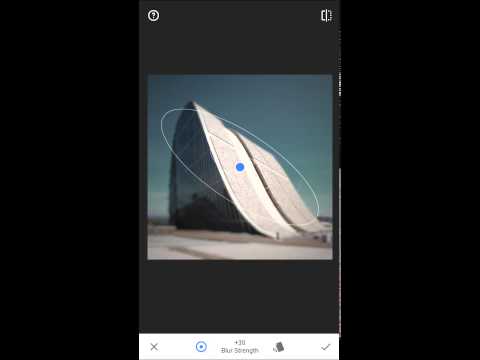
Last and certainly not least is Snapseed. This unique photo editor was scooped up by Google a few years ago and has since turned into one of the premiere photo editing apps for Android. It has support for RAW photos which will please photographers greatly. You can also tune the image using a variety of sliders and one-touch enhance tools. There are also some filters as well if you’re into that. It’s deceptively light and simple for how powerful it is and it’s entirely free with no in-app purchases.
Last and certainly not least is Snapseed. This unique photo editor was scooped up by Google a few years ago and has since turned into one of the premiere photo editing apps for Android. It has support for RAW photos which will please photographers greatly. You can also tune the image using a variety of sliders and one-touch enhance tools. There are also some filters as well if you’re into that. It’s deceptively light and simple for how powerful it is and it’s entirely free with no in-app purchases.


 Camera MOd For All Android Device
 Features:
 If you like my work hit thanks